How to Protect Your Phone from Damage: Complete Guide for 2026 Leave a comment
Your smartphone is one of the most useful—and expensive—devices you carry every day. From banking and communication to work, entertainment, photography and navigation, modern phones have become essential.
Unfortunately, everyday accidents can quickly turn an expensive smartphone into a costly repair.
A cracked screen, damaged charging port, swollen battery, water exposure or overheating can leave you with an unexpected repair bill.
The good news is that most smartphone damage is preventable.
In this complete guide, we’ll show you practical ways to protect your phone from drops, scratches, water, heat, battery damage, charging problems, malware and theft.
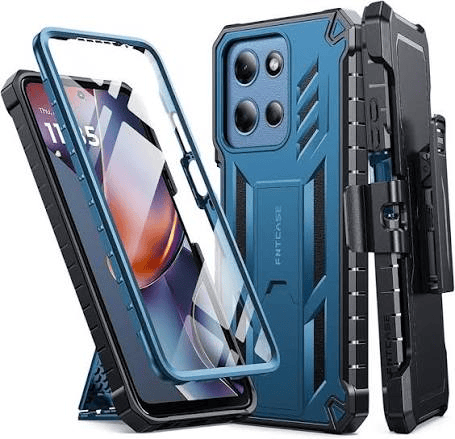
1. Use a Quality Protective Case
The simplest way to protect your phone is to put it in a good case.
A case provides a protective layer between your smartphone and the environment, particularly during accidental drops.
Look for:
- Reinforced corners
- Shock-absorbing materials
- Raised edges around the screen
- Camera protection
- Good grip
- Accurate button cutouts
- MagSafe/magnetic compatibility if needed
For people who frequently drop their phones, a rugged case is worth considering.
For everyday users, a hybrid case often provides a good balance between protection and portability.
Avoid extremely cheap cases
A case that costs very little isn’t necessarily bad, but don’t assume every case advertised as “shockproof” actually provides meaningful protection.
Look for information about the materials and testing.
2. Install a Screen Protector
Your phone’s display is one of its most vulnerable components.
A quality screen protector can help protect against:
- Scratches
- Minor impacts
- Everyday wear
- Contact with keys and other objects
Common types include:
Tempered glass
Best for general protection.
Hydrogel film
Thin and flexible.
Privacy screen protector
Useful when you don’t want people nearby viewing your screen.
Pro tip
Make sure the screen protector is compatible with your phone case.
A poorly fitted protector can lift around the edges.
3. Protect the Camera Lenses
Modern smartphones increasingly rely on advanced camera systems.
The camera lenses can protrude from the back of the phone, making them vulnerable to scratches.
A good case should provide a raised lip around the camera module.
You can also use a camera lens protector if you believe you need additional protection.
However, cheap lens protectors can sometimes interfere with:
- Image quality
- Flash
- Night photography
- Lens reflections
So choose carefully.
4. Keep Your Phone Away From Water
Even if your phone has an IP water-resistance rating, don’t treat it as waterproof.
Water resistance can deteriorate over time due to:
- Drops
- Cracks
- Repairs
- Age
- Wear and tear
Avoid deliberately exposing your phone to water.
Keep it away from:
- Swimming pools
- Showers
- Wet countertops
- Heavy rain
- Toilets
- Drinks
If your phone gets wet
Immediately:
- Remove it from the water.
- Disconnect the charger.
- Turn it off if possible.
- Remove accessories.
- Wipe the exterior with a soft cloth.
- Allow it to dry naturally.
Don’t do this:
❌ Don’t put the phone in rice.
Rice can introduce dust and particles into ports and openings and is not a reliable method for removing internal moisture.
5. Never Charge a Wet Phone
This is particularly important.
If moisture is detected around a charging port, don’t immediately connect a cable.
Charging electronics while moisture is present can cause electrical damage or corrosion.
Allow the connector and port to dry completely before charging.
6. Use a Quality Charger
One of the biggest mistakes smartphone owners make is buying extremely cheap chargers.
A poor-quality charger can potentially cause:
- Overheating
- Charging instability
- Battery degradation
- Electrical damage
- Fire hazards
Use chargers from reputable manufacturers and verify that they support your phone’s required charging standards.
Reliable brands worth researching
- Apple
- Samsung
- Anker
- UGREEN
- Belkin
- Baseus
The brand isn’t the only consideration, but reputable manufacturers generally provide clearer specifications and safety information.
7. Don’t Buy Fake Charging Cables
Your charging cable matters just as much as the charger.
Cheap or counterfeit cables can:
- Break easily
- Charge slowly
- Disconnect repeatedly
- Become unusually hot
- Fail to support advertised charging speeds
Look for:
- Strong connectors
- Reinforced cable ends
- Correct connector type
- Appropriate power rating
- Reputable manufacturer
For USB-C devices, check that the cable supports the power level you intend to use.
8. Avoid Extreme Heat
Heat is one of the biggest enemies of electronics.
Smartphones can become hot when:
- Gaming for long periods
- Recording video
- Charging
- Using GPS
- Sitting in direct sunlight
- Running demanding applications
Apple warns that using or charging an iPhone in very hot conditions can permanently shorten battery life, while Samsung also provides guidance about avoiding excessive heat during use and charging. (support.apple.com)
Never leave your phone:
❌ On a car dashboard in direct sunlight
❌ Inside a parked vehicle
❌ Under a pillow while charging
❌ Next to a strong heat source
9. Don’t Cover Your Phone While Charging
It’s tempting to put your phone under a pillow or blanket while sleeping.
Don’t.
Charging generates heat, and covering the device can prevent that heat from escaping effectively.
Instead, charge your phone on a hard, open surface with adequate ventilation.
10. Take Care of the Battery
Your phone battery is a consumable component.
Over time, lithium-ion batteries naturally lose capacity.
You can help preserve battery health by avoiding unnecessary heat and using reliable charging accessories.
Good habits
- Keep your phone cool
- Use quality chargers
- Avoid repeatedly letting the battery reach 0%
- Use optimized/adaptive charging features where available
- Replace an aging battery when necessary
You don’t need to obsess over keeping the battery at exactly 50%.
Modern smartphones have built-in battery management systems designed to handle normal charging patterns.
11. Don’t Use Your Phone While Driving
This isn’t just about protecting the phone—it’s about protecting you.
If you need navigation, use a secure car mount and configure your route before driving.
Avoid:
- Typing messages
- Watching videos
- Browsing social media
- Taking photos
- Holding the phone while driving
A phone can be replaced.
A life cannot.
12. Keep Your Phone Away From Keys
Keys, coins and other hard objects can scratch your smartphone.
Don’t place your phone in the same pocket as:
- Keys
- Coins
- Metal tools
- Sharp objects
A separate pocket or protective pouch can help.
13. Clean Your Phone Correctly
Your smartphone collects dirt and fingerprints every day.
Clean it regularly using a soft microfiber cloth.
Avoid:
❌ Abrasive materials
❌ Excessive water
❌ Spraying liquid directly onto the phone
❌ Harsh chemicals unless specifically recommended by the manufacturer
Pay particular attention to:
- Screen
- Camera lenses
- Speakers
- Charging port
14. Keep the Charging Port Clean
Dust and lint can accumulate inside the charging port.
This can cause:
- Loose connections
- Slow charging
- Charging interruptions
- Cable problems
If your charging cable suddenly stops fitting properly, don’t force it.
Have the port inspected or cleaned safely.
Important
Don’t insert sharp metal objects into the charging port.
You could damage the contacts.
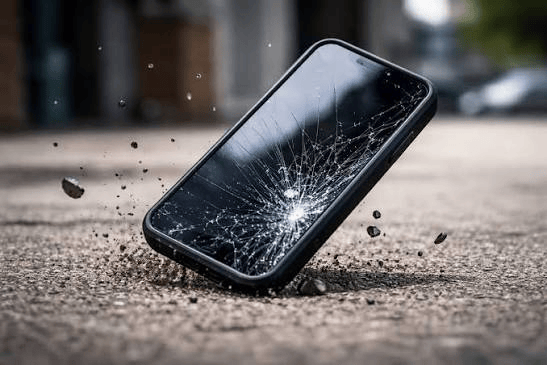
15. Protect Your Phone From Drops
Most phone damage happens when the device hits the ground.
Develop better handling habits:
- Don’t balance the phone on your lap
- Avoid using it near balconies
- Don’t place it on unstable surfaces
- Use two hands when taking photos
- Consider a phone grip if you frequently drop your phone
A case with good grip can significantly reduce accidental slips.
16. Use a Phone Grip or Ring Holder
If you have a large smartphone, a grip can make it easier to hold securely.
This is particularly useful for:
- Large iPhones
- Samsung Galaxy Ultra models
- Gaming phones
- Foldables
A magnetic grip can also be useful if your phone supports a compatible magnetic accessory system.
17. Protect Your Phone From Theft
Physical protection isn’t only about preventing cracks.
Your phone also contains valuable information.
If your phone is stolen, the consequences can include:
- Financial loss
- Account takeover
- Privacy breaches
- Identity theft
Enable:
🔐 Screen lock
🔐 Fingerprint authentication
🔐 Face recognition
🔐 Find My iPhone / Find My Device
🔐 Two-factor authentication
Never use an easily guessed PIN such as:
1234
or
0000
18. Enable Find My Device
If your phone is lost or stolen, a tracking feature can help you locate it or secure your information.
iPhone
Use Find My.
Android
Use Google’s Find Hub/Find My Device functionality, depending on your device and Android version.
Make sure the feature is enabled before your phone disappears.
19. Protect Your Phone From Malware
A smartphone can be damaged digitally as well as physically.
Be careful with:
- Unknown APK files
- Fake apps
- Suspicious links
- Pirated applications
- Fake software updates
- Untrusted websites
Android users
Download apps primarily from trusted sources such as Google Play.
iPhone users
Use Apple’s App Store and avoid suspicious configuration profiles or links asking you to install unknown software.
20. Don’t Ignore Software Updates
Software updates aren’t just about getting new features.
They can include:
- Security patches
- Bug fixes
- Performance improvements
- Compatibility updates
Enable automatic updates where appropriate.
Keeping your phone updated reduces exposure to known security vulnerabilities.
21. Back Up Your Important Data
Imagine dropping your phone and discovering that the screen, storage or motherboard has been damaged.
The physical phone can be replaced.
Your photos, documents and contacts may not be recoverable.
Back up important information regularly.
iPhone
Consider iCloud Backup.
Android
Use Google backup services and/or another trusted cloud or computer backup.
Important files can also be stored on an external drive.
22. Don’t Overload Your Phone With Apps
Too many unnecessary applications can:
- Consume storage
- Drain battery
- Use background resources
- Increase security risks
Review your apps regularly.
If you haven’t used an application for months, consider uninstalling it.
23. Be Careful With Cheap Repairs
If your screen breaks, don’t automatically choose the cheapest repair shop.
Poor-quality replacement components can cause:
- Touch problems
- Display issues
- Battery problems
- Face ID/fingerprint issues
- Water-resistance loss
- Future hardware problems
For expensive smartphones, use an authorized service provider or a reputable technician with a strong track record.
24. Don’t Attempt Dangerous DIY Repairs
YouTube tutorials can make phone repair look easy.
However, modern smartphones contain delicate components and lithium-ion batteries.
Avoid opening your phone if you don’t have the proper tools and knowledge.
A damaged battery can become dangerous if punctured or mishandled.
25. Protect Foldable Phones Differently
Foldable smartphones require additional care.
If you own a foldable:
- Don’t press hard on the inner display
- Keep sand and dust away from hinges
- Don’t insert objects between the screens
- Use the recommended case
- Follow the manufacturer’s cleaning instructions
- Don’t force the hinge
Foldables can be more vulnerable to certain types of debris and physical stress than conventional smartphones.
26. Use a Waterproof Pouch When Necessary
If you’re going to a beach, swimming area, boat trip or location with significant water exposure, a waterproof phone pouch can provide an additional layer of protection.
But don’t assume a cheap pouch is automatically reliable.
If your phone is essential during an activity, test the pouch before putting the phone inside.
27. Don’t Put Your Phone in Your Back Pocket
This is an easy way to damage a smartphone.
You could:
- Sit on it
- Bend it
- Drop it
- Forget it’s there
- Damage the screen
A front pocket or secure bag compartment is generally safer.
28. Be Careful With Your Phone in the Bathroom
Bathrooms are surprisingly risky environments for smartphones.
Potential hazards include:
- Water
- Humidity
- Drops
- Hard surfaces
- Toilets
- Steam
If possible, leave the phone outside.
29. Protect Your Phone During Travel
Before travelling, consider:
✔ Protective case
✔ Screen protector
✔ Power bank
✔ Quality charging cable
✔ Travel charger
✔ Backup of important data
✔ Find My/Find Hub enabled
Keep your phone somewhere secure rather than in an exposed pocket.
30. Know When Your Phone Needs Professional Attention
Stop using the phone and seek professional help if you notice:
- Battery swelling
- Burning smell
- Excessive heat
- Smoke
- Cracked battery area
- Charging port damage
- Screen lifting away from the frame
- Repeated unexpected shutdowns
Especially important:
If your phone’s battery is swelling, don’t continue charging it.
A damaged lithium-ion battery can pose a serious safety risk.
10 Golden Rules for Protecting Your Phone
If you don’t want to remember everything in this guide, remember these ten rules:
1. 📱 Use a quality case
Don’t use your expensive phone completely unprotected.
2. 🛡️ Protect the screen
A good screen protector can prevent everyday scratches and minor damage.
3. 🔌 Use quality chargers
Avoid suspiciously cheap charging accessories.
4. 🔋 Look after the battery
Avoid excessive heat.
5. 💧 Keep water away
Water resistance isn’t the same as waterproofing.
6. ☀️ Avoid extreme temperatures
Never leave your phone baking inside a car.
7. 🧹 Keep ports clean
Don’t force dirty or damaged cables into the charging port.
8. 🔐 Secure your phone
Use a strong PIN, biometrics and two-factor authentication.
9. ☁️ Back up your data
Protect your photos, documents and contacts.
10. 🔧 Use reputable repair services
Cheap repairs can become expensive problems.
Best Phone Protection Setup for Nigerians
For everyday Nigerian users, we recommend this simple setup:
📱 Protection
Shock-resistant case + tempered glass
🔌 Charging
Quality USB-C/Lightning cable + reputable fast charger
🔋 Power
10,000mAh–20,000mAh quality power bank
🔐 Security
Strong PIN + biometrics + Find My/Find Hub + 2FA
☁️ Backup
Cloud backup + important files stored elsewhere
🌡️ Environment
Keep the phone away from excessive heat, water, dust and direct sunlight.
This combination provides protection against many of the most common smartphone problems without requiring you to spend a fortune.
Final Thoughts
Protecting your phone isn’t about wrapping it in bubble wrap or being afraid to use it.
It’s about developing simple habits that prevent expensive problems.
A good case can reduce damage from drops. A quality charger can make charging safer. A power bank can help during long days without electricity. Regular backups can protect your data. Security features can protect your personal information if the phone is lost or stolen.
For Nigerian smartphone users, the biggest threats are often drops, heat, unreliable charging accessories, water, theft and accidental damage.
The best protection strategy is therefore simple:
Protect the hardware. Protect the battery. Protect your data. Protect your identity.
Your smartphone may eventually need to be replaced—but with the right habits, you can significantly extend its useful life and avoid unnecessary repair costs.