
Best Gadgets for Working From Home: Essential Tech for a Productive Home Office Leave a comment
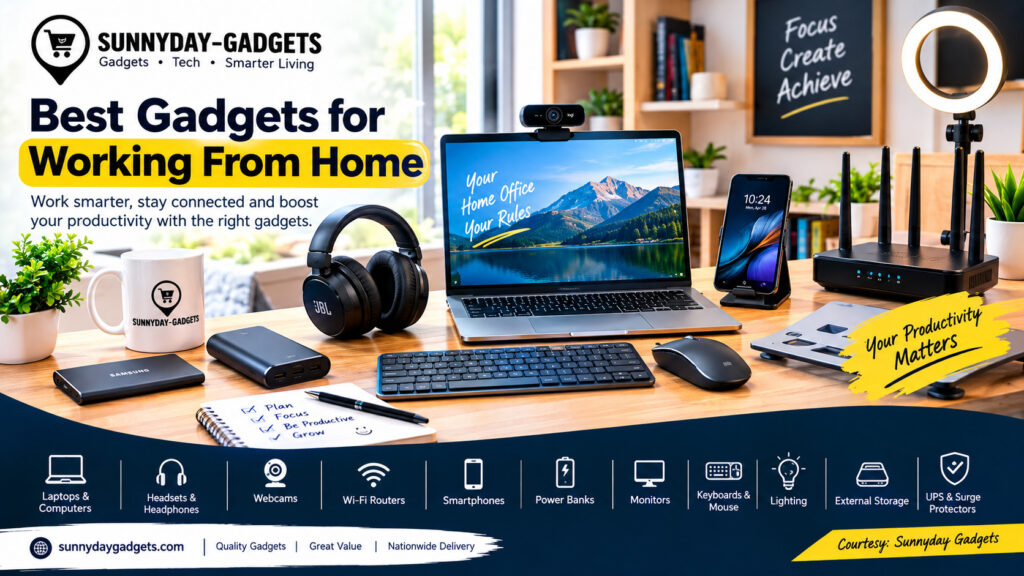
Working from home has become increasingly popular among remote employees, freelancers, entrepreneurs, students, and digital professionals. However, having a comfortable workspace is only part of the equation. The right gadgets can improve productivity, communication, comfort, and the overall work-from-home experience.
From reliable laptops and fast internet connections to webcams, headphones, power banks, and ergonomic accessories, investing in the right technology can help you work more efficiently from home. https://www.pcmag.com/picks/wfh-101-the-best-home-office-devices
In this guide, we explore some of the best gadgets for working from home and what to consider before buying them.
Why the Right Gadgets Matter When Working From Home
A good home-office setup can help you stay focused, communicate effectively, and complete tasks more efficiently. The right gadgets can also reduce common problems such as poor video quality, unstable internet connections, background noise, and uncomfortable working positions.
For remote workers, technology is essentially the connection between the home office and the workplace.
1. Laptop or Desktop Computer
A reliable computer is the foundation of any work-from-home setup.
When choosing a laptop or desktop, consider:
- Processor performance
- RAM capacity
- Storage
- Battery life
- Display quality
- Webcam quality
- Number of USB and connectivity ports
For general office work, browsing, emails, Microsoft Office, and video conferencing, a modern laptop with adequate RAM and SSD storage can provide a smooth experience.
Professionals working with video editing, programming, graphic design, cybersecurity, or other demanding applications may need more powerful hardware.
2. High-Quality Headset or Headphones
A good headset can make virtual meetings much easier.
Noise-cancelling headphones can reduce distractions from household noise, while a headset with a quality microphone can make your voice clearer during meetings and calls.
Look for:
- Clear microphone quality
- Comfortable ear cushions
- Good battery life for wireless models
- Noise cancellation
- Bluetooth or wired connectivity
- Compatibility with your computer and smartphone
If you regularly participate in Zoom, Microsoft Teams, Google Meet, or other online meetings, a reliable headset can be a worthwhile investment.
3. Webcam
Although many laptops include built-in webcams, a dedicated webcam can provide better video quality.
A good webcam can improve:
- Video resolution
- Autofocus
- Low-light performance
- Image clarity
- Framing
For professionals who frequently attend online meetings, interviews, webinars, or create video content, a quality webcam can help create a more professional appearance.
4. Reliable Wi-Fi Router
A stable internet connection is essential for working from home.
A reliable Wi-Fi router can help improve connection stability and provide better coverage throughout your home.
When choosing a router, consider:
- Wi-Fi generation
- Coverage area
- Number of connected devices
- Internet speed supported
- Security features
- Ethernet ports
For larger homes or areas with Wi-Fi dead zones, a mesh Wi-Fi system may provide better coverage than a single router.
5. Smartphone
Your smartphone can serve as an important backup device for remote work.
It can help you:
- Respond to work messages
- Join meetings
- Check emails
- Use mobile hotspots
- Access cloud storage
- Scan documents
- Communicate with clients
A smartphone with good battery life and reliable mobile connectivity can be particularly useful when your primary internet connection is unavailable.
6. Power Bank or Portable Power Station
Reliable electricity is an important consideration when setting up a home office, particularly in Nigeria.
A suitable power bank can keep your smartphone, wireless accessories, and other compatible devices running when there is no immediate access to electricity.
For people who work for several hours from home, a larger portable power station or backup power system can provide additional support for devices such as laptops, routers, monitors, and phones.
Before buying, check the power output, battery capacity, charging ports, safety features, and compatibility with your devices.
7. Ring Light or Desk Light
Good lighting can make a significant difference during video calls.
A ring light or adjustable desk light can improve visibility and reduce shadows, particularly when working in a room with limited natural light.
When choosing a light, look for adjustable brightness and different lighting modes where available.
8. External Monitor
An external monitor can make multitasking easier by providing additional screen space.
For example, you could keep your email or communication application on one screen while working on documents, spreadsheets, websites, or other projects on another.
Consider:
- Screen size
- Resolution
- Refresh rate
- Connectivity
- Adjustable stand
- Eye-comfort features
An external monitor can be especially useful for programmers, designers, analysts, writers, and other professionals who regularly work with multiple applications.
9. Wireless Keyboard and Mouse
A wireless keyboard and mouse can help create a cleaner and more flexible desk setup.
They can also be useful when your laptop is connected to an external monitor.
Look for accessories with comfortable designs, reliable wireless connectivity, long battery life, and compatibility with your operating system.
10. Laptop Stand
A laptop stand can improve your workstation by raising your screen closer to eye level.
This can help you maintain a more comfortable viewing position during long working sessions.
A stand can also improve airflow around some laptops and create additional desk space underneath the computer.
11. External Storage or SSD
Backing up important work files is essential.
An external SSD can provide fast storage for documents, photographs, videos, website files, and other important data.
You can also combine local storage with cloud services to create a more comprehensive backup strategy.
For important business files, consider maintaining multiple copies so that a hardware failure does not result in permanent data loss.
12. Surge Protector or UPS
A surge protector can help protect electronic equipment from certain electrical disturbances.
A UPS can provide temporary backup power for compatible devices and may give you enough time to save your work and safely shut down equipment during a power interruption.
For a home office in Nigeria, a suitable UPS or backup power solution can be a practical addition to your setup.
Best Gadgets for Working From Home: What Should You Buy First?
You do not necessarily need to purchase everything at once.
If you are building a home office on a budget, prioritize the equipment that directly affects your productivity:
Basic setup:
- Laptop
- Headset
- Reliable internet connection
- Smartphone
- Power bank
Intermediate setup:
- External monitor
- Wireless keyboard and mouse
- Laptop stand
- Webcam
- Desk lighting
Advanced setup:
- Portable power station
- UPS
- External SSD
- Mesh Wi-Fi system
- Professional microphone
- Multiple monitors
Tips for Choosing Work-From-Home Gadgets
Before purchasing a gadget, consider your actual work requirements rather than simply choosing the most expensive option.
Consider Your Budget
Create a budget and prioritize essential equipment first.
Check Compatibility
Make sure accessories work with your laptop, smartphone, operating system, and other equipment.
Prioritize Reliability
A dependable gadget that lasts for several years can provide better value than a cheaper product that needs frequent replacement.
Think About Power Consumption
Energy-efficient devices can be particularly useful when electricity costs and backup-power requirements are important considerations.
Protect Your Devices
Use strong passwords, software updates, antivirus/security tools, and secure Wi-Fi settings to protect work devices and information.
Final Thoughts
The best gadgets for working from home depend on your profession, budget, workspace, and daily workload. A reliable laptop, stable internet connection, good headset, smartphone, and appropriate backup power can provide a strong foundation.
As your needs grow, you can add an external monitor, webcam, ergonomic accessories, external storage, improved lighting, and other productivity tools.
For Nigerian remote workers, it is also important to consider power availability, internet reliability, device durability, warranty support, and after-sales service when choosing technology.
Sunnyday Gadgets provides technology products, gadget information, buying guides, and technology solutions to help individuals and businesses make smarter technology decisions.
